

Hi players,
in the early morning of Feb 9th 2026 (CET) there will be a new release. Please be prepared to download new client and enter the 2.0 server.
Here is the changelog:
2026-02-09 version 2.0
- port from qmake to cmake
- port from Qt5 to Qt6.9.2 LTS
- port to libboost >=1.83
- removed mysqplpp dependency
- removed curl dependency
- removed tinyxml dependency
- removed sqlite3 dependency
- removed gsasl dependency
- removed libSDL dependency
- implemented TLS for websocket-Server
- implemented TLS for game-server & client
- new feature: dark-/light-/auto (system) appearance mode with settings option and translations
- replaced gsasl auth mechanism with plain text auth (encrypted in combination with TLS!)
- macOS: several bugfixes, functional build for macOS Monterey as minimum OS version
- android: Qt Widget GUI adapted to qt6 - no more fixed Width/Height values in ui files
- removed QtSingleApplication dependency
- reproducable docker build environments for linux, windows and android build
- reproducable build_macos.sh Script for easy build & deploy on macOS
- new feature: 33%, 50%, 100% pot bet sizes with settings option and translations
- server heartbeat to handle former silent client disconnects
The old GUI has not changed, but we do have a functional android client for arm64 and x64 now and a 100% bugfree macOS client.
This release is more an interim release. A new GUI release will follow maybe in summer of 2026.
PokerTH-2.0 release on Monday, Feb 9th 2026

Just to clarify a few things.
You will need to update the client manually to 2.0 in order to play on the new server. The old server will still be up for a little while. When you connect to the Internet game, there will be both servers to chose from.
But the old server will only work with the old client and the new server will only work with the new client. You cannot mix server and client versions.
You will need to update the client manually to 2.0 in order to play on the new server. The old server will still be up for a little while. When you connect to the Internet game, there will be both servers to chose from.
But the old server will only work with the old client and the new server will only work with the new client. You cannot mix server and client versions.
How to register: viewtopic.php?f=24&t=29
Reset password: https://www.pokerth.net/app.php/user/forgot_password
Reset password: https://www.pokerth.net/app.php/user/forgot_password
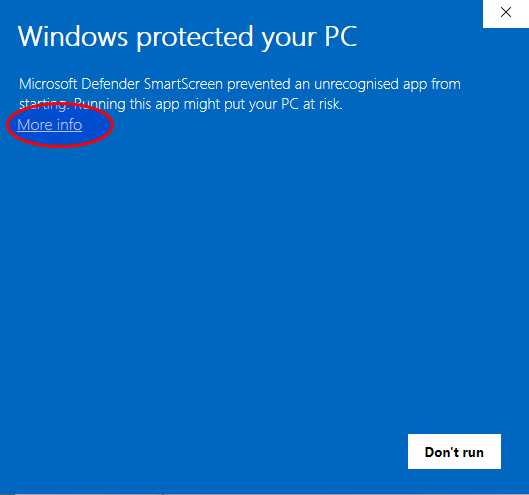
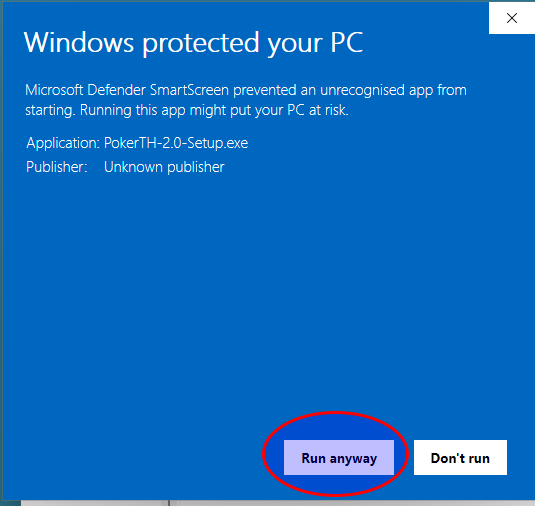
For Windows installation you need to allow the installer to run
How to register: viewtopic.php?f=24&t=29
Reset password: https://www.pokerth.net/app.php/user/forgot_password
Reset password: https://www.pokerth.net/app.php/user/forgot_password
Linux users need to extract the archive somewhere. Then you can start the client from the terminal by changing into the directory and run or by double clicking the pokerth file in that directory.
You can also create a pokerth2.desktop file in ~/.local/share/applications with the following content
You need to adjust the line starting with Exec= to your system. Then you should be able to run the client from your start menue.
Code: Select all
./pokerthYou can also create a pokerth2.desktop file in ~/.local/share/applications with the following content
Code: Select all
[Desktop Entry]
Name=PokerTH 2.0
Name[bg]=PokerTH
Name[de]=PokerTH
Name[es]=PokerTH
Name[fr]=PokerTH
Name[it]=PokerTH
Name[nl]=PokerTH
Name[pl]=PokerTH
Name[pt_BR]=PokerTH
Name[pt_PT]=PokerTH
Name[ru]=PokerTH
Name[tr]=PokerTH
Name[uk]=PokerTH
GenericName=Poker Card Game
GenericName[bg]=Играта на покер
GenericName[de]=Pokerspiel
GenericName[es]=Juego de Poker
GenericName[fr]=Jeu de Poker
GenericName[it]=Gioco di Poker
GenericName[nl]=Pokerspel
GenericName[pl]=Gra w poker
GenericName[pt_BR]=Jogo do Poker
GenericName[pt_PT]=Jogo do Poker
GenericName[ru]=Игра в покер
GenericName[tr]=Poker Kart Oyunu
GenericName[uk]=Гра в покер
Comment=Texas hold'em game
Comment[bg]=Играта на Тексас Холдем
Comment[de]=Texas Hold'em Spiel
Comment[es]=Juego de Texas Hold'em
Comment[fr]=Jeu de Texas Hold'em
Comment[it]=Gioco di Poker alla Texano
Comment[nl]=Texas Hold'em-spel
Comment[pl]=Gra w teksański klincz
Comment[pt_BR]=Jogo do Texas Hol'dem
Comment[pt_PT]=Jogo do Texas Hol'dem
Comment[ru]=Игра в техасский холдем
Comment[tr]=Texas hold'em oyunu
Comment[uk]=Гра в техаський холдем
Exec=/path/to/pokerth-linux-binary/pokerth
Icon=pokerth
Terminal=false
Type=Application
X-DCOP-ServiceType=Multi
X-KDE-StartupNotify=true
Categories=Qt;Game;CardGame;
How to register: viewtopic.php?f=24&t=29
Reset password: https://www.pokerth.net/app.php/user/forgot_password
Reset password: https://www.pokerth.net/app.php/user/forgot_password
One more tip for Windows users: The folder C:\Users\your-username\AppData is hidden by default. You can go there by typing %appdata% followed by ENTER in the Windows search box.
How to register: viewtopic.php?f=24&t=29
Reset password: https://www.pokerth.net/app.php/user/forgot_password
Reset password: https://www.pokerth.net/app.php/user/forgot_password
PokerTH 2.0 Release test period is over now - old 1.1.2 server will be shutdown 2026-02-16 at 7am CET.
Please re-download PokerTH-2.0 client with latest bugfixes after(!) server-shutdown here: Download
(you might need to clear your browser cache!)
Thank you very much to all players who tested and reported bugs!
Please use the forum to report any errors.
Your PokerTH Team
Please re-download PokerTH-2.0 client with latest bugfixes after(!) server-shutdown here: Download
(you might need to clear your browser cache!)
Thank you very much to all players who tested and reported bugs!
Please use the forum to report any errors.
Your PokerTH Team